
A tilt-and-turn window has two operating paths, so a cat-net plan based on one open photograph is incomplete. In tilt mode, the top of the sash moves inward; in turn mode, the full sash swings through the room. Handles rotate, hinges occupy corners, and cleaning or service access may need the sash fully open. The net boundary must therefore be surveyed with both modes demonstrated and without treating the moving sash, insect screen, or removable trim as an assumed structural fixing point. The goal is a compatible boundary that an installer can verify, not a promise that one standard detail fits every frame.
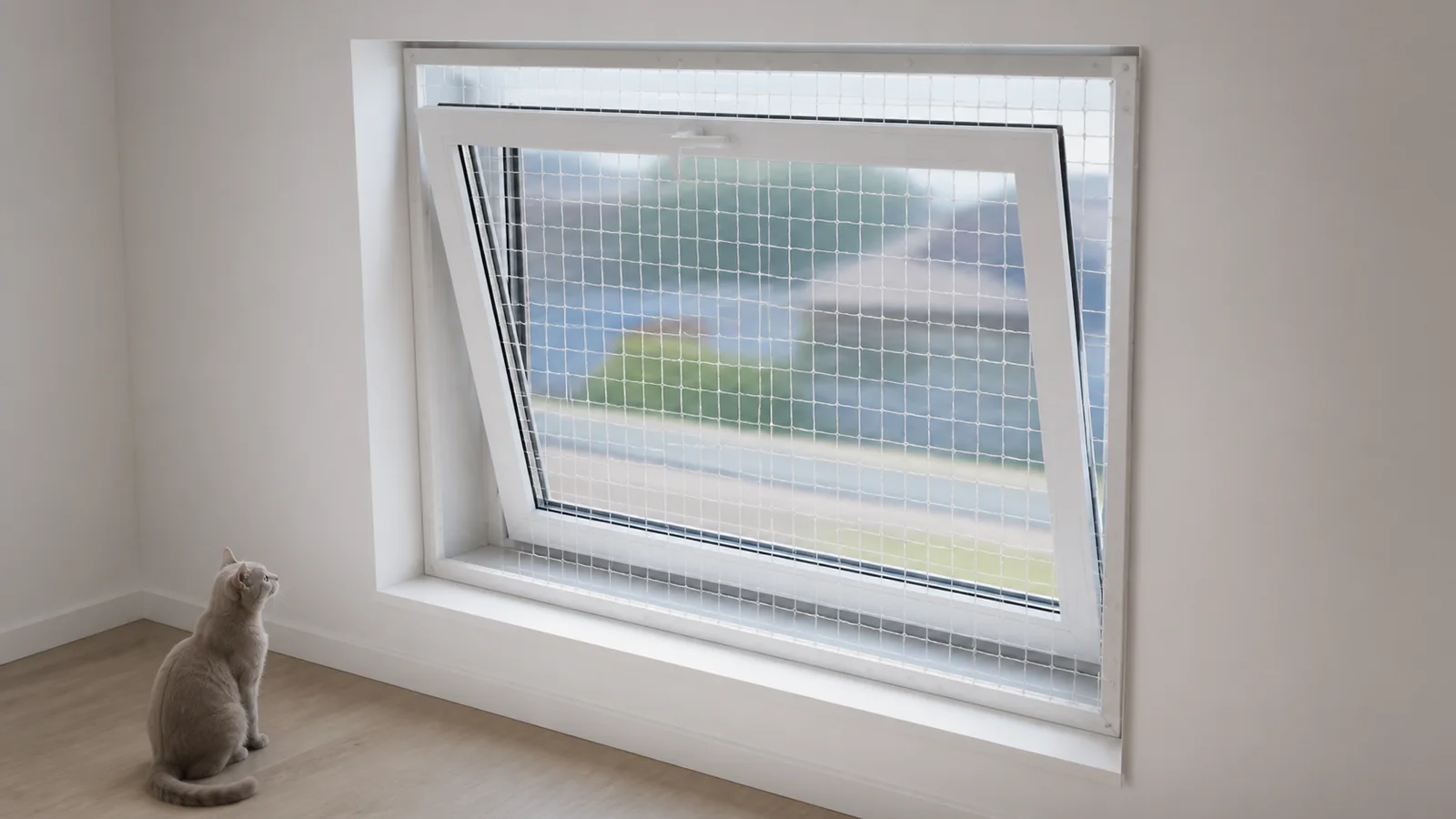
Identify the Window and Every Operating Mode
which sash, handle, hinge, restrictor, frame, and reveal make up the exact opening For this cat net tilt turn window opening modes task, the responsible team should label the window and photograph it closed, tilted, and fully turned under normal authorized operation. At identify the window and every operating mode, verify the cat net tilt turn window opening modes condition together with its identity before the working state changes.
At the identify the window and every operating mode stage, retain opening ID, room and exterior orientation, overall views, handle positions, hinge side, sash count, and existing screens. Link each photograph, count, mark, drawing, or note to the cat net tilt turn window opening modes item it describes. For identify the window and every operating mode, keep the location and responsible role beside opening ID, room and exterior orientation, overall views, handle positions, hinge side, sash count, and existing screens so the next reviewer can repeat the check.
Two windows with the same room size can use different hardware and movement paths. That boundary governs cat net tilt turn window opening modes, not a different product or site. When evidence supports several interpretations, route the cat net tilt turn window opening modes uncertainty through identify the window and every operating mode to the role authorized by this release condition: the survey shows every intended mode and component.
Close identify the window and every operating mode only when the survey shows every intended mode and component. If open, preserve the cat net tilt turn window opening modes state and name the unresolved point, owner, next evidence, and follow-up action. Pair opening ID, room and exterior orientation, overall views, handle positions, hinge side, sash count, and existing screens with the next identify the window and every operating mode review before custody, stock, equipment, or site work changes.
Before moving on, compare opening ID, room and exterior orientation, overall views, handle positions, hinge side, sash count, and existing screens with the release condition: the survey shows every intended mode and component. This final comparison gives the cat net tilt turn window opening modes handoff its usable context. For identify the window and every operating mode, the receiving role should be able to reconstruct the decision from opening ID, room and exterior orientation, overall views, handle positions, hinge side, sash count, and existing screens without relying on memory.
Trace the Tilt Path
where the top edge, corners, handle, and hardware move when the sash tilts inward For this cat net tilt turn window opening modes task, the responsible team should observe the full authorized tilt movement and mark the closest approaches to the proposed net plane. At trace the tilt path, verify the cat net tilt turn window opening modes condition together with its identity before the working state changes.
At the trace the tilt path stage, retain side views, top-corner views, frame depth, reference points, handle clearance, and any restrictor. Link each photograph, count, mark, drawing, or note to the cat net tilt turn window opening modes item it describes. For trace the tilt path, keep the location and responsible role beside side views, top-corner views, frame depth, reference points, handle clearance, and any restrictor so the next reviewer can repeat the check.
A photograph cannot create a universal clearance or approve contact with moving hardware. That boundary governs cat net tilt turn window opening modes, not a different product or site. When evidence supports several interpretations, route the cat net tilt turn window opening modes uncertainty through trace the tilt path to the role authorized by this release condition: the proposed boundary remains outside the verified tilt path.
Close trace the tilt path only when the proposed boundary remains outside the verified tilt path. If open, preserve the cat net tilt turn window opening modes state and name the unresolved point, owner, next evidence, and follow-up action. Pair side views, top-corner views, frame depth, reference points, handle clearance, and any restrictor with the next trace the tilt path review before custody, stock, equipment, or site work changes.
Before moving on, compare side views, top-corner views, frame depth, reference points, handle clearance, and any restrictor with the release condition: the proposed boundary remains outside the verified tilt path. This final comparison gives the cat net tilt turn window opening modes handoff its usable context. For trace the tilt path, the receiving role should be able to reconstruct the decision from side views, top-corner views, frame depth, reference points, handle clearance, and any restrictor without relying on memory.
Trace the Turn Path
how the full sash, handle, and hinge side sweep through the interior when opened For this cat net tilt turn window opening modes task, the responsible team should map the swing arc and the positions needed for ventilation, cleaning, emergency procedure, or maintenance as applicable. At trace the turn path, verify the cat net tilt turn window opening modes condition together with its identity before the working state changes.
At the trace the turn path stage, retain plan view sketch, open angles used, handle projection, adjacent wall or furniture, and installer notes. Link each photograph, count, mark, drawing, or note to the cat net tilt turn window opening modes item it describes. For trace the turn path, keep the location and responsible role beside plan view sketch, open angles used, handle projection, adjacent wall or furniture, and installer notes so the next reviewer can repeat the check.
Preserving only tilt mode may be unacceptable when the owner requires turn-mode access. That boundary governs cat net tilt turn window opening modes, not a different product or site. When evidence supports several interpretations, route the cat net tilt turn window opening modes uncertainty through trace the turn path to the role authorized by this release condition: the buyer records which modes remain available after installation.
Close trace the turn path only when the buyer records which modes remain available after installation. If open, preserve the cat net tilt turn window opening modes state and name the unresolved point, owner, next evidence, and follow-up action. Pair plan view sketch, open angles used, handle projection, adjacent wall or furniture, and installer notes with the next trace the turn path review before custody, stock, equipment, or site work changes.
Before moving on, compare plan view sketch, open angles used, handle projection, adjacent wall or furniture, and installer notes with the release condition: the buyer records which modes remain available after installation. This final comparison gives the cat net tilt turn window opening modes handoff its usable context. For trace the turn path, the receiving role should be able to reconstruct the decision from plan view sketch, open angles used, handle projection, adjacent wall or furniture, and installer notes without relying on memory.
Decision and Evidence Matrix
Use this compact matrix to keep the physical item, working record, and release decision aligned.
| Review Point | What to Record | Release Question |
|---|---|---|
| Identify the Window and Every Operating Mode | opening ID, room and exterior orientation, overall views, handle positions, hinge side, sash count, and existing screens | the survey shows every intended mode and component |
| Trace the Tilt Path | side views, top-corner views, frame depth, reference points, handle clearance, and any restrictor | the proposed boundary remains outside the verified tilt path |
| Trace the Turn Path | plan view sketch, open angles used, handle projection, adjacent wall or furniture, and installer notes | the buyer records which modes remain available after installation |
| Choose an Independent Fixing Line | substrate photos, edge distances, surface condition, proposed perimeter, fixing proposal, permission, and exclusions | the fixing line is approved or clearly held for site review |
Choose an Independent Fixing Line
which stable substrate can carry the planned perimeter without using the moving sash or removable screen For this cat net tilt turn window opening modes task, the responsible team should review frame, reveal, wall, sill, and approved no-drill or drilled options with the installer and building authority where relevant. At choose an independent fixing line, verify the cat net tilt turn window opening modes condition together with its identity before the working state changes.
At the choose an independent fixing line stage, retain substrate photos, edge distances, surface condition, proposed perimeter, fixing proposal, permission, and exclusions. Link each photograph, count, mark, drawing, or note to the cat net tilt turn window opening modes item it describes. For choose an independent fixing line, keep the location and responsible role beside substrate photos, edge distances, surface condition, proposed perimeter, fixing proposal, permission, and exclusions so the next reviewer can repeat the check.
Material selection cannot compensate for an unverified substrate or fixing method. That boundary governs cat net tilt turn window opening modes, not a different product or site. When evidence supports several interpretations, route the cat net tilt turn window opening modes uncertainty through choose an independent fixing line to the role authorized by this release condition: the fixing line is approved or clearly held for site review.
Close choose an independent fixing line only when the fixing line is approved or clearly held for site review. If open, preserve the cat net tilt turn window opening modes state and name the unresolved point, owner, next evidence, and follow-up action. Pair substrate photos, edge distances, surface condition, proposed perimeter, fixing proposal, permission, and exclusions with the next choose an independent fixing line review before custody, stock, equipment, or site work changes.
Before moving on, compare substrate photos, edge distances, surface condition, proposed perimeter, fixing proposal, permission, and exclusions with the release condition: the fixing line is approved or clearly held for site review. This final comparison gives the cat net tilt turn window opening modes handoff its usable context. For choose an independent fixing line, the receiving role should be able to reconstruct the decision from substrate photos, edge distances, surface condition, proposed perimeter, fixing proposal, permission, and exclusions without relying on memory.
Plan Cleaning and Screen Access
how glazing, hinges, insect screens, drainage, and surrounding finishes remain accessible For this cat net tilt turn window opening modes task, the responsible team should simulate the maintenance sequence and identify removable net sections only when a qualified system is designed for them. At plan cleaning and screen access, verify the cat net tilt turn window opening modes condition together with its identity before the working state changes.
At the plan cleaning and screen access stage, retain cleaning route, screen removal path, access owner, removable component, inspection point, and handover note. Link each photograph, count, mark, drawing, or note to the cat net tilt turn window opening modes item it describes. For plan cleaning and screen access, keep the location and responsible role beside cleaning route, screen removal path, access owner, removable component, inspection point, and handover note so the next reviewer can repeat the check.
An improvised opening in the net can create an uncontrolled boundary gap. That boundary governs cat net tilt turn window opening modes, not a different product or site. When evidence supports several interpretations, route the cat net tilt turn window opening modes uncertainty through plan cleaning and screen access to the role authorized by this release condition: required access has a documented method and responsible person.
Close plan cleaning and screen access only when required access has a documented method and responsible person. If open, preserve the cat net tilt turn window opening modes state and name the unresolved point, owner, next evidence, and follow-up action. Pair cleaning route, screen removal path, access owner, removable component, inspection point, and handover note with the next plan cleaning and screen access review before custody, stock, equipment, or site work changes.
Before moving on, compare cleaning route, screen removal path, access owner, removable component, inspection point, and handover note with the release condition: required access has a documented method and responsible person. This final comparison gives the cat net tilt turn window opening modes handoff its usable context. For plan cleaning and screen access, the receiving role should be able to reconstruct the decision from cleaning route, screen removal path, access owner, removable component, inspection point, and handover note without relying on memory.
Demonstrate the Finished Boundary
whether both window modes, net edges, corners, handles, and access conditions match the approved survey For this cat net tilt turn window opening modes task, the responsible team should perform installer handover with the owner using the exact operating sequence and inspect every perimeter segment. At demonstrate the finished boundary, verify the cat net tilt turn window opening modes condition together with its identity before the working state changes.
At the demonstrate the finished boundary stage, retain closed, tilt, turn, and edge views, opening ID, installer, owner acknowledgment, limitations, and reinspection trigger. Link each photograph, count, mark, drawing, or note to the cat net tilt turn window opening modes item it describes. For demonstrate the finished boundary, keep the location and responsible role beside closed, tilt, turn, and edge views, opening ID, installer, owner acknowledgment, limitations, and reinspection trigger so the next reviewer can repeat the check.
Handover confirms the observed installation rather than an absolute guarantee against every behavior or future change. That boundary governs cat net tilt turn window opening modes, not a different product or site. When evidence supports several interpretations, route the cat net tilt turn window opening modes uncertainty through demonstrate the finished boundary to the role authorized by this release condition: the user understands operation, inspection, and escalation.
Close demonstrate the finished boundary only when the user understands operation, inspection, and escalation. If open, preserve the cat net tilt turn window opening modes state and name the unresolved point, owner, next evidence, and follow-up action. Pair closed, tilt, turn, and edge views, opening ID, installer, owner acknowledgment, limitations, and reinspection trigger with the next demonstrate the finished boundary review before custody, stock, equipment, or site work changes.
Before moving on, compare closed, tilt, turn, and edge views, opening ID, installer, owner acknowledgment, limitations, and reinspection trigger with the release condition: the user understands operation, inspection, and escalation. This final comparison gives the cat net tilt turn window opening modes handoff its usable context. For demonstrate the finished boundary, the receiving role should be able to reconstruct the decision from closed, tilt, turn, and edge views, opening ID, installer, owner acknowledgment, limitations, and reinspection trigger without relying on memory.
Buyer Checklist
- Identify the exact tilt-and-turn hardware before selecting the net plane.
- Record closed, tilt, and turn positions because each creates a different movement envelope.
- Map handle and hinge paths with reference points rather than guessed clearances.
- Keep moving sash and removable screen separate from the approved fixing substrate.
- Preserve required cleaning and maintenance access through a designed method.
- Demonstrate both opening modes during installer handover.
- Trigger another review after hardware, furniture, screen, or fixing-line changes.
Frequently Asked Questions
Can a cat net be fixed directly to the moving sash?
The fixing method belongs to the qualified installer and exact window system. A moving sash should never be assumed to be a suitable structural fixing point.
Must both tilt and turn modes remain usable?
The owner and installer should define the required operating modes before design. The finished boundary should be checked against that agreed requirement.
Does a no-drill method fit every tilt-and-turn frame?
No. Frame profile, surface, reveal, movement, permission, and system-specific fixing requirements need project review.
Related Product or Reading
Use the recessed-window survey guide when frame depth and handle clearance also affect the proposed boundary.
Discuss the Exact Project
Send MaxCatNet closed, tilt, and turn photos, frame and reveal measurements, handle and hinge details, screen information, required access, fixing restrictions, and material preference.